Introduction:
Top 7 Websites Creating a visually appealing and functional website from scratch can be time-consuming and expensive. Luckily, there are many high-quality websites offering free web design templates that can speed up your workflow and help you launch faster — without compromising on quality.
Please stay tuned for useful information.
Whether you’re a developer, designer, startup founder, or student, here are the top 7 trusted websites to download free templates for your next project.
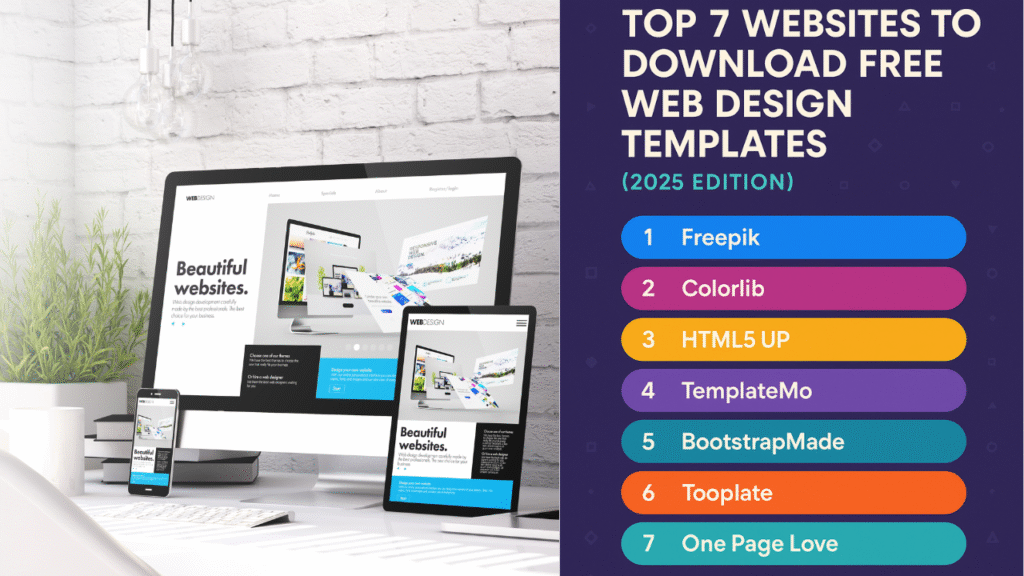
Top 7 Websites-Web Design Templates
1. Freepik – Free UI Kits, Templates, and Mockups
🔗 Website: https://www.freepik.com
Freepik is a giant in the design resource world. While it’s best known for illustrations and vectors, it also has a growing library of HTML website templates, UI kits, and landing pages suitable for different platforms.
🔹 Key Features:
- High-quality, editable HTML/CSS templates
- UI kits for Figma, Adobe XD, Sketch
- Web elements and icons for customization
- Both free and premium assets
✅ Best For: Designers looking for pixel-perfect visual assets and mockups.
2. Colorlib – Responsive Bootstrap Templates
🔗 Website: https://colorlib.com
Colorlib offers a wide collection of modern, mobile-ready HTML templates built with Bootstrap 4 and 5. Their focus on user experience and SEO makes these templates perfect for launching production-ready websites quickly.
🔹 Key Features:
- 1000+ free HTML5 templates
- Categories like business, education, restaurants, portfolios, etc.
- Clean design and optimized structure
✅ Best For: Developers needing fast, responsive layouts that are easy to adapt.
3. HTML5 UP – Super Clean, Fully Responsive Designs
🔗 Website: https://html5up.net
HTML5 UP stands out for its elegant, minimalist templates. All of its templates are open source, licensed under Creative Commons, and suitable for both personal and commercial use.
🔹 Key Features:
- Built with HTML5, CSS3, Sass
- Lightweight and mobile-first
- Modular, easy to customize
✅ Best For: Developers or startups who prefer clean markup and fast-loading designs.
4. TemplateMo – Beautiful Free CSS Templates
🔗 Website: https://templatemo.com
TemplateMo offers a refreshing collection of free HTML5/CSS3 templates. With a strong emphasis on typography and layout structure, it’s ideal for small businesses, landing pages, or corporate sites.
🔹 Key Features:
- SEO-friendly, easy-to-edit code
- Bootstrap-powered templates
- Clean navigation, great for showcasing portfolios
✅ Best For: Small business websites, personal branding, and portfolios.
5. BootstrapMade – Templates for Every Industry
🔗 Website: https://bootstrapmade.com
BootstrapMade provides well-organized templates built with HTML5, Bootstrap, and modern UI/UX practices. With industry-specific templates and consistent updates, it’s a go-to platform for startups and agencies.
🔹 Key Features:
- Easy starter templates
- SEO and mobile optimization
- Free and premium options
✅ Best For: Agencies, SaaS startups, and marketing sites.
6. Tooplate – Simple and Elegant Templates
🔗 Website: https://www.tooplate.com
Tooplate offers a wide variety of minimalist and responsive templates. With quick previews and no signup required, it’s one of the easiest places to grab a clean layout and go live quickly.
🔹 Key Features:
- Minimalist design
- Quick download without account
- Templates for portfolios, blogs, and more
✅ Best For: Portfolios, students, and educational institutions.
7. One Page Love – Single Page Website Templates
🔗 Website: https://onepagelove.com
One Page Love specializes in single-page templates, ideal for landing pages, event sites, product launches, or personal resumes. It offers both free and premium templates with sleek animations and mobile-first layouts.
🔹 Key Features:
- Hand-curated one-page designs
- HTML + WordPress themes
- Animation-ready and mobile-friendly
✅ Best For: Personal branding, landing pages, product promos.
🚀 Bonus: Other Notable Mentions
While the top 7 are industry favorites, here are a few additional sources worth exploring:
- UIdeck – Startup and SaaS HTML templates
- Nicepage – Visual editor with drag-and-drop HTML export
- ThemeWagon – Free and premium themes for various niches
✨ Tips for Using Free Templates Effectively
🔸 Always read the license terms. Some require attribution, others may restrict commercial use.
🔸 Customize the template fully to avoid SEO issues due to duplicated content.
🔸 Optimize assets like images, CSS, and JavaScript for faster loading times.
🔸 Add accessibility features (like alt tags, contrast ratios) to make your site user-friendly.
🔸 Use a code editor or visual builder to tailor the look to your brand identity.
📌 Final Thoughts: Your Website Journey Just Got Easier
Finding the right design for your website doesn’t have to be hard — and thanks to these free template websites, you don’t have to start from scratch. Whether you’re building a blog, portfolio, business site, or something creative, these platforms give you beautiful designs that you can customize to fit your needs.
Think of these templates as a solid starting point. From there, you can tweak colors, fonts, layouts, and content to match your own brand or style. And since many of these templates are mobile-friendly and built with SEO in mind, you’re already one step ahead in building a site that not only looks good but performs well.
Before using any template, just make sure to check the usage rights — especially if it’s for a client or business. Most of them are free for personal use, and many also allow commercial use with proper credit.
“Explore these sites and find the perfect template for your next project. If you found this list helpful, feel free to share it or bookmark for later!”